Avia Weather - METAR & TAF
- 4.9
- Rating
- 500.00K
- Installs
- Free
- Price

 Analysis by App-foxy
When I want a quick aviation weather check rather than a general forecast, I prefer a tool that puts the relevant reports in front of me without making me dig through a crowded weather dashboard. Avia Weather - METAR & TAF is built for that narrower job. It is an Android weather app from Remy Webservices UG that focuses on METAR and TAF information for pilots, and its straightforward approach is its main appeal.
I found the app most useful when I already knew the airport I wanted to check and needed a compact picture of current conditions and the forecast trend. It is not trying to replace flight planning software, navigation equipment, or a broad consumer weather service. Instead, it works as a practical aviation-weather reader for people who understand what airport reports mean and want them close at hand.
The current release is version 3.10.1, and the app has been available since January 21, 2014. That long presence matters to me because it suggests a product that has had time to settle into a specific purpose rather than chasing every new weather-app fashion. It is free to install, rated for Everyone, and supports Android 8.0 or later. Optional purchases range from $0.99 to $20.00 per item, so I would check the available upgrade choices inside the app before assuming every function is included at no cost.
You May Also Like

 Blood Strike: 2.5 Anniversary
Blood Strike’s Loadouts Turn Every Drop Into a Tactical Gamble
A close look at Blood Strike’s custom loadouts: how fast access to signature weapons reshapes its battle royale rhythm, rewards preparation, and narrows the gap between fights.

 Pandora - Music & Podcasts
Pandora’s Music Is Easy to Start, but Harder to Recover
Pandora’s strength is its low-effort path from a seed to a station. Its weak spot is how much confidence it asks you to place in connection, setup, and quiet recovery.

 8 Ball Pool
 Is Built on Rivalries, Rematches, and Routine
A close look at the rivalries, rematches, shared routines, and unanswered safety questions that turn a quick pool match into a persistent mobile community.

 Samsung Music
’s Quiet Strength Is Playing What You Already Own
Its reach comes less from spectacle than from dependable access to a personal library. That simplicity is both the app’s strongest retention engine and its ceiling.

 AccuWeather: Weather Radar
AccuWeather Review: A Quick, Clear Forecast for Everyday Decisions
For everyday plans, the best forecast is the one you can understand quickly. AccuWeather makes rain timing, radar, and local conditions easy to act on, with a few trade-offs.

 Hill Climb Racing
Why Hill Climb Racing Still Turns Crashes Into One More Run
A tiny car, a bumpy hill and one more upgrade: Hill Climb Racing keeps resurfacing because its simple chaos makes every near-miss feel personal.
More From Our News Desk



How Avia Weather fits into a pilot’s routine
When I build Avia Weather into a pilot’s routine, I treat it as a quick checkpoint between the broader briefing and the final decision, not as a substitute for either. A useful habit is to check the same key airports again closer to departure and notice whether the latest observation supports the forecast you already reviewed. That repeat check can sharpen awareness of changing conditions while keeping the app’s role—and its limits—clear.
A focused view instead of a general forecast
Most everyday weather apps are designed around maps, hourly temperatures, rain alerts, radar layers, and location-based forecasts. Those are useful when I am deciding whether to walk, commute, or pack an umbrella, but they are not the clearest way to inspect aviation reports. Avia Weather takes the opposite approach: it makes airport weather the center of the experience.
That focus is valuable for a pilot who thinks in terms of departure, destination, alternate, and route airports. Rather than starting with a broad map and filtering down, I can work from the aerodromes that matter to the flight. The app’s purpose is especially clear for checking a METAR for observed conditions and a TAF for the expected development. The important benefit is not visual spectacle; it is reducing the distance between opening the app and finding the report I need.
There is also a learning advantage for newer pilots. A general weather app can show a reassuring sun icon while the airport report contains the details that matter in the cockpit, such as wind, visibility, cloud information, and pressure. Avia Weather encourages the habit of looking at aviation-specific information instead of treating a consumer forecast as a complete operational picture. I still would not use a phone app as the sole basis for a go or no-go decision, but it is a useful part of a disciplined check.
What the METAR and TAF pairing gives you
The strongest part of the concept is the pairing of present observation and forecast. A METAR tells me what the airport is reporting now, while a TAF helps me consider how conditions may change. Looking at both is more useful than reading either one in isolation. A good current report does not guarantee a comfortable arrival later, and a difficult observation may be temporary rather than representative of the whole period.
I recommend reading the report in a fixed order instead of scanning randomly. I start with the report time, then look at wind, visibility, significant weather, clouds, temperature and dew point, and pressure. After that, I compare the TAF period and its changes with the planned departure or arrival window. This workflow makes the app more useful than simply opening it and glancing at a color or summary.
For someone still learning coded reports, the app is best treated as a reading aid rather than a replacement for training. METAR and TAF abbreviations are compact by design, and the consequences of misunderstanding a group can be serious. I would use the app alongside official briefing material and local procedures until the format becomes familiar.
A realistic everyday flight scenario
Imagine I am preparing for a short morning flight. Before leaving home, I check the departure airport, destination, and a likely alternate. At the departure field, the METAR shows the current wind and visibility. The destination report looks acceptable, but its TAF indicates a change around my expected arrival time. That difference is the useful discovery: the present condition alone would not have told the whole story.
I can then repeat the check closer to departure and compare whether the new observation is moving in the expected direction. If the reports are changing faster than expected, I know I need a fuller briefing and perhaps a revised plan. The app does not make that decision for me, and I would not want it to. Its value is that it makes the relevant reports easy to revisit during the preparation process.
Another practical use is a quick post-flight check when I am away from my usual desk setup. If I need to review the weather at an unfamiliar airport, a focused METAR and TAF reader is less distracting than a general-purpose weather app. That is a small convenience, but repeated small conveniences are exactly where a specialist tool earns a place on a phone.
What existing users gain from the current version
For someone who has used the app for a while, version 3.10.1 is best understood as a current, maintained point in the product’s ongoing development rather than a completely different category of app. The important continuity is the aviation-first purpose. Existing users who already like a direct METAR and TAF workflow should find the current release aligned with the reason they installed it in the first place.
I would be cautious about expecting a version number alone to transform the experience. A release update can improve reliability, compatibility, presentation, or small parts of the workflow without changing the basic job of the app. That is not a weakness by itself. In a tool used for routine weather checks, predictable behavior can be more valuable than constant redesign.
The app’s age also gives it a useful perspective. It first appeared in January 2014, so it is not a new experiment that has yet to prove whether its idea is practical. At the same time, older apps can feel less modern than the latest all-in-one aviation platforms. My judgment is that users should value it for focused access to reports, not for expecting the broadest possible flight-planning ecosystem.
Where it compares well with usual alternatives
Compared with a standard weather app, Avia Weather is more relevant when the question is, “What is this airport reporting, and what is forecast there?” A consumer app may be easier for a non-pilot because it translates conditions into familiar language, but that simplicity can hide the aviation details I actually need. For a licensed pilot or student pilot, the specialist focus is the better fit.
Compared with a full electronic flight bag or flight-planning platform, the trade-off goes the other way. Those broader tools may combine weather with routing, charts, aircraft information, notices, and operational planning. I would choose one of them when I need a complete preflight environment. Avia Weather makes more sense as a dedicated weather reader or a lightweight companion when I want to inspect airport reports without opening a larger system.
Compared with visiting a website, the app’s advantage is convenience and repetition. A saved or familiar airport workflow can be faster than navigating through a browser every time. The disadvantage is that a specialist app should never encourage me to forget the official briefing sources and procedures required for a particular flight. Convenience is helpful only when it supports, rather than replaces, proper preparation.
Small workflow choices that make it more useful
My first tip is to build a personal check sequence around airports, not around the app’s interface. I identify the departure, destination, and alternate before opening the reports. That prevents me from wandering through weather information simply because it is available. It also makes it easier to notice a meaningful difference between fields rather than treating every report as equally important.
My second tip is to compare the observation and forecast by time, not just by appearance. A TAF that looks acceptable overall may contain a temporary period that overlaps the planned arrival. Conversely, a poor current METAR may improve before the flight window. I write down or mentally note the relevant times, then return to the app later instead of assuming the first check remains valid.
My third tip is to use the app for trend awareness, not false certainty. Rechecking the same airport can show whether the latest observation supports the forecast, but it cannot guarantee what will happen during a flight. If the information is borderline, I treat that as a reason to consult broader official resources and reconsider the plan, not as an invitation to search for a more comfortable interpretation.
A fourth useful habit is separating “quick look” from “decision source.” I use Avia Weather for a fast, focused look at the reports, then use the required briefing process for the actual operational decision. This division keeps the app in its strongest role and avoids asking a compact reader to provide functions it was not designed to replace.
Limitations and points of friction
The narrow focus that makes the app attractive can also make it feel limited. If I want radar, satellite imagery, detailed local forecasts, route weather, charts, notices, or integrated planning, I need another service or a broader aviation platform. Someone who wants one app to handle every part of a flight may find this approach too specialized.
The coded nature of METAR and TAF information is another barrier. The app can be useful to a learner, but the user still needs aviation-weather knowledge to interpret the reports responsibly. A beginner looking for plain-language explanations and gentle guidance may prefer a more educational weather product, at least while building confidence with the codes.
There is also a practical question around optional purchases. The app is free to install, but in-app items cost between $0.99 and $20.00. That does not automatically make the value poor, yet it means I would review exactly which functions I need before paying. A casual user who checks an airport once in a while may not want an expanded purchase, while a frequent pilot may consider a useful specialist feature worth the expense.
The Android requirement of 8.0 or newer is reasonable for many current phones, but it still excludes devices that cannot update that far. I would check compatibility before planning to rely on it for a trip. The Everyone content rating is reassuring for general access, although the aviation context means the responsibility for interpreting and acting on weather information remains with the user.
Who should install it, and who should skip it
I would recommend Avia Weather to pilots, student pilots, and aviation enthusiasts who regularly need airport-specific METAR and TAF information in a compact form. It is especially suitable for someone who already understands the basics of coded weather reports and wants a repeatable way to check several airports during preparation.
I would also consider it for a pilot who already uses a full flight-planning app but wants a separate, quick weather reference. Keeping the weather check separate can be useful when I am comparing reports or checking an airport without opening a complete planning workflow.
I would skip it as my main weather app if I am not involved in aviation or if I mainly want ordinary daily forecasts. A family deciding whether to go outside, a commuter checking rain, or a traveler wanting a simple hourly outlook will probably find a mainstream weather app more comfortable. I would also look elsewhere if I expect built-in route planning, rich visual maps, or a complete electronic flight bag.
What I would watch in future development
Because the current version is 3.10.1, I would watch future updates for improvements that preserve the app’s directness rather than adding clutter. Better handling of repeated airport checks, clearer separation between current observations and forecast periods, and smooth compatibility with newer Android releases would matter more to me than decorative interface changes.
I would also pay attention to how the app balances free access and optional purchases. A specialist utility earns trust when the basic workflow remains clear and predictable, while paid additions are easy to understand before purchase. For existing users, transparent changes are particularly important because aviation weather is a routine task where surprises create unnecessary friction.
Most importantly, I would judge updates by whether they help me make fewer reading mistakes. A cleaner presentation of report times, forecast transitions, and airport selection would have real value. The best evolution for this app is not becoming a generic weather super-app; it is becoming an even more dependable companion for the specific METAR and TAF checks it already centers on.
My final recommendation
Avia Weather is a focused weather app that knows what it wants to be. Its strong point is the direct relationship between airport observations and forecasts, while its main limitation is that it does not aim to cover every part of modern flight planning. In my experience, that trade-off is sensible when I need a quick aviation-weather reference and already have the knowledge to interpret the reports.
The app has a 4.9 average from around 28 thousand ratings, with over 500 thousand installs, which fits the impression of a well-established specialist tool rather than an obscure experiment. I would not choose it because of those figures alone, but they do make it easier to take the product seriously when deciding whether to try it.
My recommendation is simple: install it if METAR and TAF checks are part of your normal routine, use it deliberately, and keep official briefing sources in the loop. If you want colorful everyday forecasts or an all-in-one flight-planning system, choose a different tool. For pilots who value a straightforward airport-weather reader, the free entry point and focused design make Avia Weather - METAR & TAF worth considering, provided you treat it as a useful instrument in your workflow rather than the entire workflow itself.
FAQs for Avia Weather - METAR & TAF
01What is Avia Weather - METAR & TAF used for?
Avia Weather - METAR & TAF is designed to help pilots, aviation students, and flight enthusiasts check current and forecast airport weather conditions. It provides METAR observations and TAF forecasts, including wind, visibility, cloud cover, temperature, pressure, and significant weather. The app is especially useful for quickly reviewing aviation weather before a flight, although it should support—not replace—official briefing sources and approved flight-planning procedures.
02Does Avia Weather provide real-time METAR and TAF information?
The app is built around aviation weather reports and normally retrieves METAR and TAF data from online sources, so an internet connection is generally required to obtain the latest information. Availability and update timing can depend on the reporting airport and data provider. Before relying on a report for an actual flight, users should check its observation or issue time and confirm the information through official aviation weather services.
03Can beginners understand the METAR and TAF reports in the app?
Avia Weather presents standard aviation weather information, but users who are unfamiliar with METAR and TAF codes may initially find the reports difficult to read. The app can be helpful for learning because it focuses on aviation-specific data and may offer decoded or easier-to-read details depending on the platform version. Beginners should still study official decoding guidance rather than treating the app as a substitute for proper weather training.
04Can I save and monitor specific airports with Avia Weather?
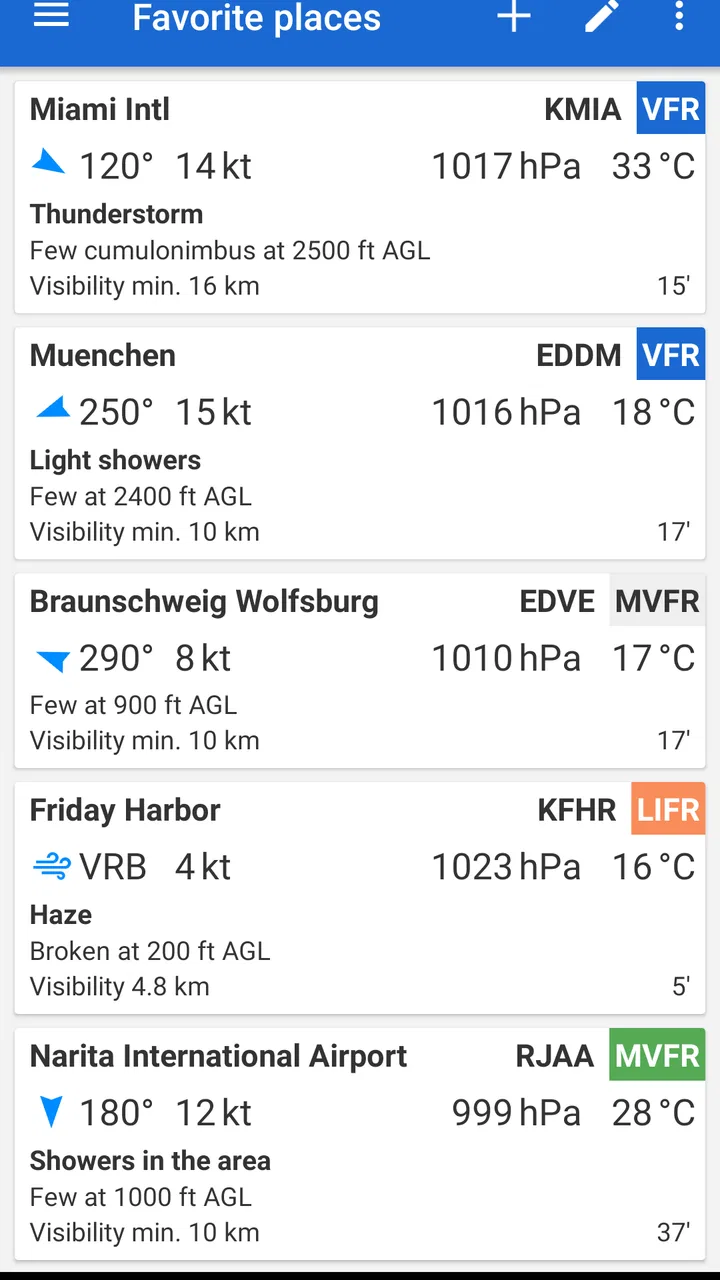
The application is intended for checking weather at selected airports, making it convenient to keep frequently used locations close at hand. Depending on the version and device, users may be able to create a list of favorite airports or quickly search by airport identifier. This is useful for personal flight planning, route monitoring, or checking local conditions, but users should verify that the selected airport and runway information are correct.
05Is Avia Weather suitable for making flight decisions?
Avia Weather can be a convenient reference tool for reviewing METAR and TAF information, but it should not be the only source used for operational flight decisions. Weather reports can change quickly, data may be delayed, and the app may not include every briefing product required for a particular flight. Pilots should consult official aviation weather services, NOTAMs, charts, and applicable regulations before departure.
Pros
- Provides accurate METAR and TAF reports for flight planning.
- Supports airport searches by name
- code
- or nearby location.
- Shows weather trends in a clear
- aviation-focused format.
- Includes useful information such as wind
- visibility
- and cloud conditions.
- Offers weather data for airports worldwide.
Cons
- Some advanced features may require a paid subscription.
- Forecast terminology can be difficult for casual users to understand.
- Weather updates depend on the availability of airport reports.
- The interface may feel too technical for non-pilots.
- Ads or upgrade prompts may interrupt the free experience.

Avia Weather - METAR & TAF
Gallery